


If you are using the Minimal theme and want to add tabs to your product pages, I'll show you exactly how in this tutorial. A few months ago, I published a tutorial on how to add tabs to your product pages in Shopify, and I've had a number of people comment on that post saying that they were having problems adding the tabs to the Minimal theme. After doing some research, I found that the Minimal theme already has the support for tabs built in, so in this tutorial I'll show you how to take advantage of that feature in Minimal and add tabs to your own product pages.
If you're not using the Minimal theme, head over to this page for a tutorial on how to add tabs to other Shopify themes.
Warning: If you already tried my other tutorial for adding tabs to product pages, and are now trying to get the tabs working in the Minimal theme, make sure to delete any code that you added from that tutorial.
Step 1: Open the product editor in your Shopify Dashboard
After opening up the product you want to edit, click the "View HTML" button over the top right corner of the text area. 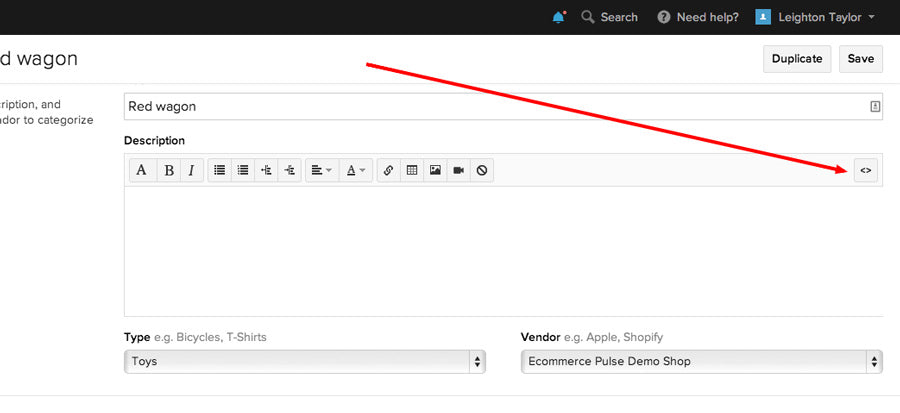
Step 2: Paste this code into the product description
[code]
<ul class="tabs">
<li><a class="active" href="#tab1">Tab 1</a></li>
<li><a href="#tab2">Tab 2</a></li>
<li><a href="#tab3">Tab 3</a></li>
</ul>
<ul class="tabs-content">
<li class="active" id="tab1">
<p>Tab 1 content goes here.</p>
</li>
<li id="tab2">
<p>Tab 2 content goes here.</p>
</li>
<li id="tab3">
<p>Tab 3 content goes here.</p>
</li>
</ul>
[/code]
Your product should now look something like this: 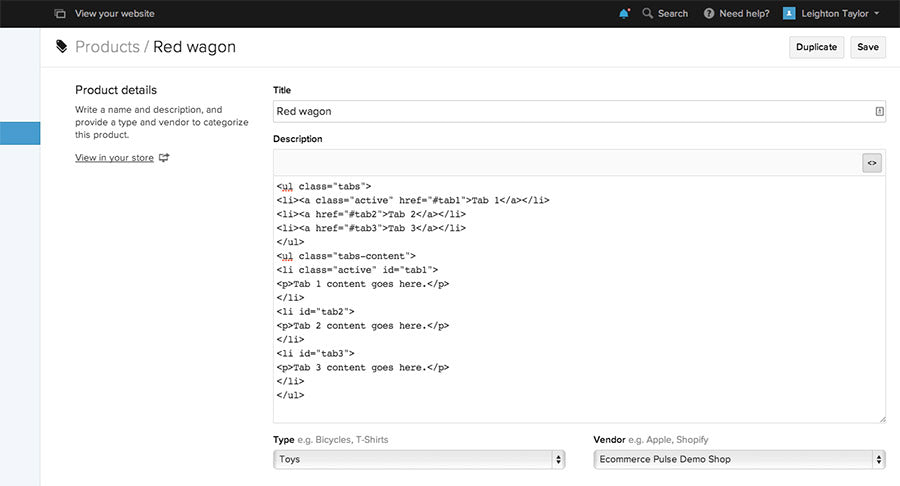
Step 3: Edit the labels and content for each tab
I highly recommend editing the labels and content from within the HTML editor, rather than using the visual editor. This is because the visual editor tends to mess up the HTML code that you pasted in.
Step 4: Save
Click "Update" or "Save" to save the changes you made to the product. Then go ahead and view the product on your website to make sure the tabs are showing up properly.
I hope that went smoothly for you! If you had any problems, please leave a comment below with a description of the problem and I'll do my best to help.

Comments (39)
Hey Jermaine, you can just copy and paste the code for a single tab two times, and change the numbers to 4 and 5. It would look like this:
<ul class="tabs">
<li><a class="active" href="#tab1">Tab 1</a></li>
<li><a href="#tab2">Tab 2</a></li>
<li><a href="#tab3">Tab 3</a></li>
<li><a href="#tab4">Tab 4</a></li>
<li><a href="#tab5">Tab 5</a></li>
</ul>
<ul class="tabs-content">
<li class="active" id="tab1">
<p>Tab 1 content goes here.</p>
</li>
<li id="tab2">
<p>Tab 2 content goes here.</p>
</li>
<li id="tab3">
<p>Tab 3 content goes here.</p>
</li>
<li id="tab4">
<p>Tab 4 content goes here.</p>
</li>
<li id="tab5">
<p>Tab 5 content goes here.</p>
</li>
</ul>
I have successfully added the tabs to one of our products (Sunrice MiniBites) – just a little niggle, the content on the tab appears as a bullet point! It’s not a big deal… but would prefer if it would appear as normal text, without a bullet next to it. Any ideas?
This cool electronic gadget is available at amazon. However the buzz you feel when smoking a traditional cigarette will
not occur with an electronic cigarette, even if you are using nicotine cartridges.
The first thing you do with an electronic cigarette starter kit is to charge up the
charger pack, then you use the charger pack to charge up the battery in the
electronic cigarette.
Thanks for the code, how do I get rid off the bullet point?
Also is there a way I can bring tab 2 or 3 into focus when loading the page?
thanks again.
Figured it out, to get rid of the bullet points, simply add this to your css
ul.tabs-content > li.active { display: block; border: 0; list-style:none;}
Unlike vapour, smoke lingers leaving a highly recognisable smell.
The Buddy Pen Pro is available exclusively in Australia from Cheating the Hangman. Seventy-eight percent of
participants reported noticeable smoother looking skin.
Excellent pieces. Keep posting such kind of information on your site.
Im really impressed by your blog.
Hello there, You have performed a great job. I will definitely digg it and individually recommend to my friends.
I’m sure they’ll be benefited from this website.
Also visit my site :: Inlyte E cigarette Starter Kit
Hi – Thanks for this. Was excited that it looked so easy, but alas I am getting a bullet point list instead of tabs… can you suggest a fix?
Thanks!
can see an example here
I think the admin of this website is truly working hard in favor of his site, as here every
data is quality based material.
Hey there! I know this is kinda off topic however I’d figured I’d ask.
Would you be interested in trading links or maybe guest
writing a blog post or vice-versa? My site discusses a lot of
the same subjects as yours and I feel we could greatly benefit from each other.
If you might be interested feel free to send me an email.
I look forward to hearing from you! Superb blog by the way!